Simplest in the world design of dual projector for stereo photos
By Oleg Kosyakovsky
Table of Contents
What it is all about
This document presents the author's scheme of dual parallel projector for viewing stereo images or videos.
The design is extremely simple and includes only 4 components:
- two identical wide-screen video projectors
- one 2-port HDMI video splitter
- a set of two projection filters - polarizers, Omega, or even red/cyan
- power supplies
The input format is a regular parallel stereopair - not anamorphic. This makes such a projector best suitable for quadrant and vertical images; horizontal images will appear smaller.
Projector design description
The below drawing illustrates the design idea:
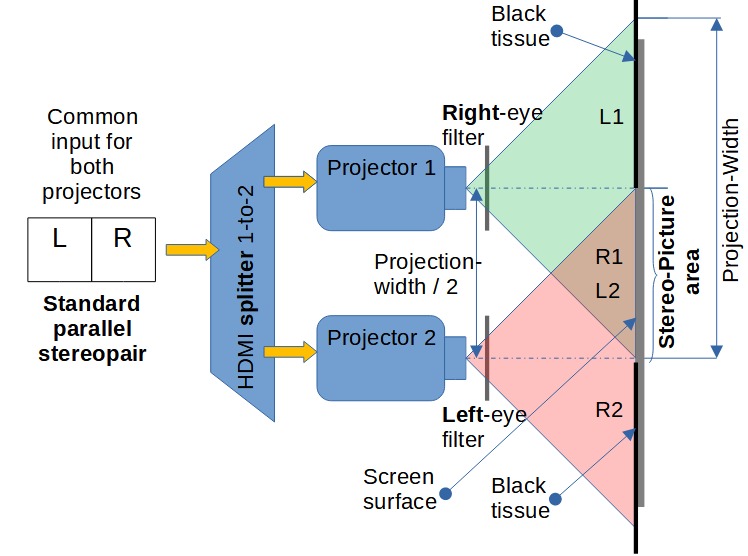
Figure 1: The dual projector scheme
Explanations:
- Place the projectors so that distance between their lenses' centers equals exactly half the projection width. This ensures proper alignment of left- and right images.
- Use the left-eye filter with the projector on the right, and right-eye filter with the projector on the left.
- Connect your HDMI output to the input of the splitter; connect the two outputs of the splitter to the projectors; order is unimportant.
- Make your video source (computer, video-player) show full-screen parallel stereopair.
- The resulting projection picture consists of 3 zones, left-to-right:
- unused left half from the left-side projector
- overlap of right half from the left-side projector and left half from the right-side projector - the stereo picture
- unused right half from the right-side projector
- unused left half from the left-side projector
- For better viewing experience, mask unused zones (1) and (3) with black tissues or strips of matte black paper.
- For polarized projection you can use glasses as projection filters if the front sides of your projectors don't heat up.
- The author used two 1280x720 projectors, and the resulting picture resolution was quite adequate.
- The author used HDMI splitter made by StarTech.